
FX File Explorer
Screenshots
FX File Explorer provides a professional and privacy-focused way to manage your mobile files and media. Most stock file managers offer limited features and often track user behavior. This application changes that by offering a completely ad-free experience with no tracking. It focuses on productivity through a unique dual-pane interface. You can move files between different folders with ease. The design follows modern aesthetics, making it simple to navigate even for beginners. It bridges the gap between basic storage viewing and advanced system management. Whether you need to organize photos or access cloud storage, this tool provides the necessary features. Its commitment to privacy makes it a preferred choice for security-conscious users.
Mastering the Dual-Pane Interface of FX File Explorer
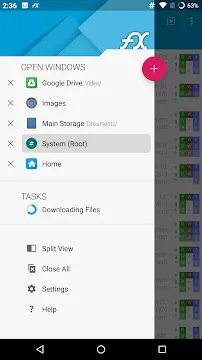
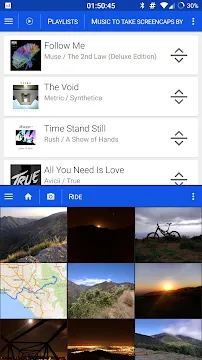
One of the most useful features of this application is the dual-pane viewing mode. This layout allows you to see two different folders on the screen at the same time. You can drag and drop files from one window to another without needing to copy and paste manually. This efficiency saves a lot of time when organizing large amounts of data.
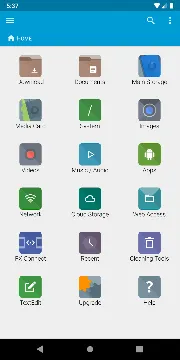
The home screen provides a clear overview of your storage. You can see how much space remains on your internal memory and SD card. It categorizes your content into sections like Documents, Downloads, Music, and Videos. This organization helps you find specific items in seconds. The interface feels snappy and responsive, ensuring that your workflow remains uninterrupted.
Why Privacy Matters with FX File Explorer
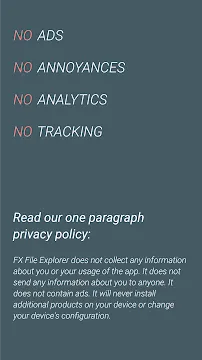
Privacy is a core pillar of the development philosophy for this app. Many file managers collect data about your usage habits or show intrusive advertisements. This tool contains no ads and does not track your location or file activity. It operates entirely on your device without sending your private information to external servers.
- No Advertisements: Enjoy a clean workspace without distracting banners.
- No Tracking: Your file history remains strictly on your local device.
- Permission Control: The app only requests access to folders you choose to manage.
This level of transparency builds trust with the user community. You can manage sensitive documents with confidence knowing that the app is not spying on you. For people who handle work-related files, this security is an essential benefit.
Advanced Networking and Cloud Support in FX File Explorer
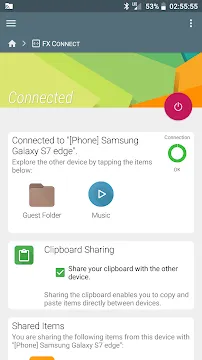
Managing files is not limited to your phone’s physical storage. This application excels at connecting to external networks and cloud services. You can link your Google Drive, Dropbox, or OneDrive accounts directly. This allows you to transfer files between your phone and the cloud seamlessly.
The app also supports various network protocols. You can access files on your home computer through SMB, FTP, or SSH. If you have a NAS (Network Attached Storage) device, the app finds it automatically. This connectivity makes the app a central control point for all your digital data. You no longer need separate apps for every cloud provider or network drive.
Media Tools and Built-in Viewers
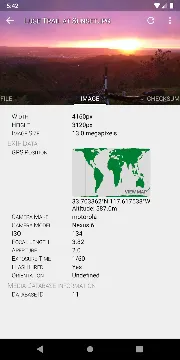
You do not need to open different apps to view your media. The file manager includes a built-in image viewer, media player, and text editor. This integration ensures that you can check the contents of a file without leaving the interface.
- Image Viewer: Browse through your photo collection with fast thumbnail loading.
- Media Player: Listen to audio files or watch videos directly within the app.
- Text Editor: Create and edit notes or code files on the go.
- Archive Support: Open and create ZIP, RAR, and 7zip files effortlessly.
These tools are highly optimized for mobile performance. They handle large files without crashing or slowing down your device. Having these utilities built-in reduces the number of extra apps you need to install.
Cleaning and Optimizing Storage
Over time, every mobile device accumulates “junk” files that take up valuable space. This manager includes a powerful “Cleaning” tool to help you reclaim your storage. It identifies large files, duplicate images, and unused application data.
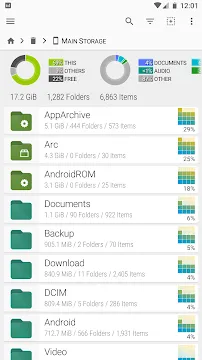
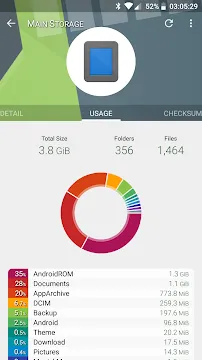
You can run a scan to see exactly where your storage is going. The visual chart shows you which folders occupy the most room. This makes it easy to delete old downloads or blurry photos that you no longer need. Regular cleaning keeps your device running smoothly and prevents storage-full warnings. The process is safe, as the app asks for confirmation before deleting any important data.
Root Access and System Management
For advanced users, the application offers a specialized “Root Explorer” mode. This feature allows you to access the system partition of your device. You can modify system files, change permissions, and explore hidden directories.
The app warns you before you enter these sensitive areas to prevent accidental damage. It provides a read-only mode by default to ensure safety. If you are a developer or a tech enthusiast, these tools are invaluable. You can customize your operating system or fix software issues directly from your phone. This makes the application a must-have for anyone who likes to tinker with their device’s settings.
Conclusion
FX File Explorer remains one of the most reliable and efficient tools for file management. It combines a user-friendly design with powerful professional features like dual-pane browsing and cloud integration. The strict “No Ads, No Tracking” policy ensures that your data remains private and secure. With its built-in media viewers and archive support, it replaces the need for several other applications. Whether you are a casual user looking to organize photos or a professional managing network drives, this app delivers a smooth experience. It respects your privacy while giving you total control over your digital life. Download it today to transform how you interact with your mobile storage.







